Best AI Agent Platform for Business Teams: 2026 Comparison Guide

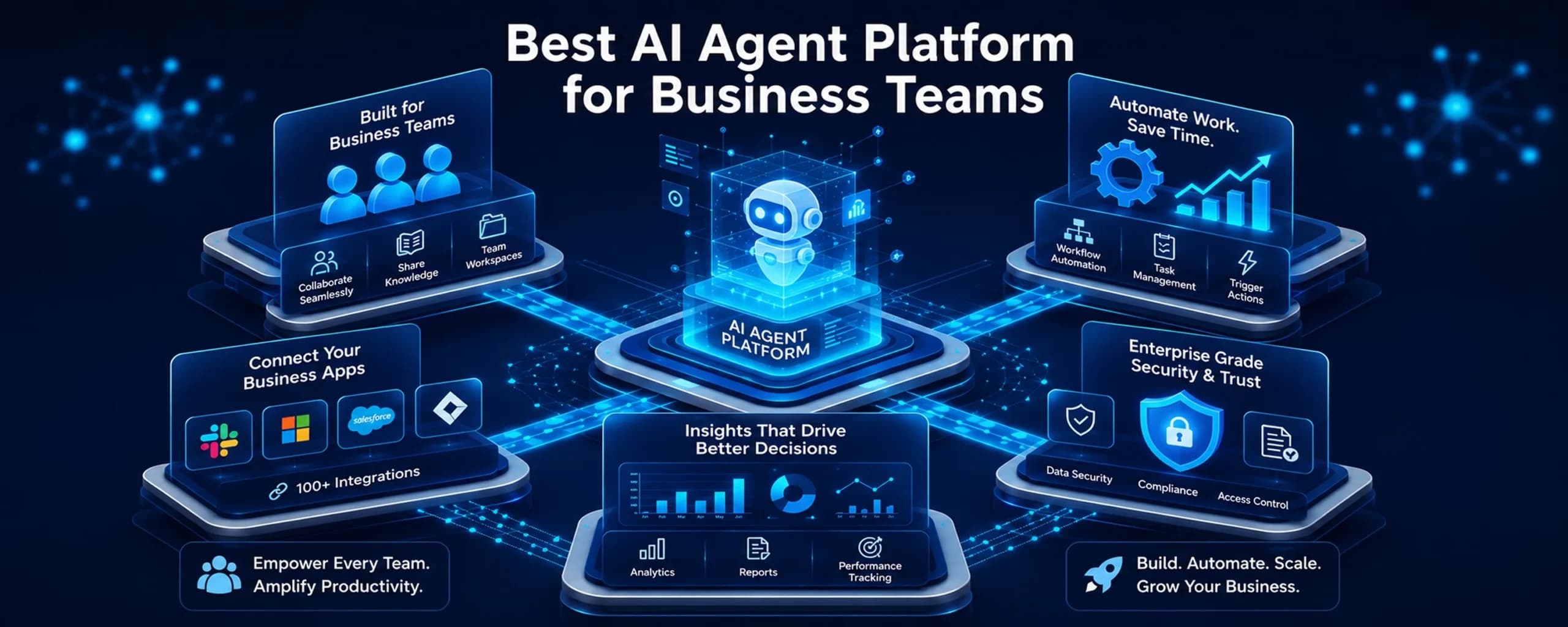
Every ops leader has hit the same wall. Your team has outgrown basic if-this-then-that automation, but you’re not ready to hire a team of AI engineers. That’s exactly the gap the best AI agent platform for business teams needs to fill: enough power to handle real, multi-step work, without demanding a computer science degree to run it.
This blog gets you what separates a true AI agent platform from repackaged automation software. We’ll compare the leading options for 2026, show you what to look for before you commit budget, and cover what to do if none of the self-serve tools quite fit.
Most of the platforms covered here were built with US business teams in mind, but the buying patterns aren’t limited to one region. Teams across North America, Europe, and APAC are asking the same question at the same time. That’s a sign this shift is structural, not a passing trend tied to one market.
What Makes an AI Agent Platform Different from Basic Automation
Traditional automation tools move data from one app to another when a specific trigger fires. They’re fast and reliable, but they can’t think. An AI agent platform adds reasoning on top of that plumbing — it can read context, make judgment calls, and decide what happens next.
That distinction matters more than marketing copy suggests. Many tools now slap “AI agent” onto features that are really just automation with a chatbot bolted on. We’ve gone deeper into this distinction in our breakdown of AI agent vs. RPA differences, which is worth a read if you’re still mapping out where your workflows actually sit.
For business teams specifically, the real question isn’t “does it use AI?” It’s whether the platform can plan, execute, and adapt across multiple steps without a human re-prompting it at every stage.
A useful test is what happens when something breaks mid-process. Basic automation stalls and waits for someone to notice. A true agent platform can retry, reroute to a fallback step, or flag the issue with context attached. That difference alone determines whether a workflow scales past a handful of use cases or stays stuck as a one-off experiment.
What to Look for in an AI Agent Platform for Business Teams
Before comparing specific tools, it helps to know which factors actually predict long-term success versus a flashy demo. Teams that skip this step often end up rebuilding their automation stack within a year.
Here’s what should be on your checklist:
- LLM and API flexibility — can it connect to Claude, GPT, Gemini, or your existing tech stack without lock-in?
- Governance and audit trails — does it log decisions for compliance and troubleshooting?
- Ease of setup — can operations staff build workflows, or does every change need a developer?
- Cost transparency — is pricing credit-based, seat-based, or usage-based, and does it scale predictably?
- Security posture — does it meet SOC2, HIPAA, or GDPR requirements relevant to your industry?
- Integration depth — does it connect natively to your CRM, help desk, and internal databases?
- Community and support — is there active documentation, a user community, or dedicated support?
| Evaluation Criteria | Why It Matters | Red Flag to Watch For |
| Governance & audit logs | Needed for compliance-heavy industries | No visibility into agent decisions |
| Setup complexity | Determines who can build and maintain workflows | Requires engineering for every tweak |
| Pricing model | Impacts total cost as usage scales | Credit costs that spike unpredictably |
Most vendor demos are designed to hide these weaknesses, not surface them. Ask for a trial period long enough to test a real, messy workflow — not just the clean example in the sales deck. If a platform can’t handle your actual edge cases within a two-week trial, it likely won’t handle them in production either.
Best AI Agent Platforms for Business Teams in 2026
The market has matured fast, and the field now splits into two camps: no-code platforms built for operations teams, and developer-first frameworks built for engineering-led builds. Here’s how the leading options stack up.
Zapier Agents remains the fastest way to add AI reasoning to workflows you already run in Zapier — ideal for lead routing, ticket triage, and CRM enrichment without writing code.
Microsoft Copilot Studio is the strongest choice if your company already lives inside Microsoft 365 and Power Platform, thanks to native Teams and Dataverse integration.
Salesforce Agentforce is purpose-built for CRM-driven teams, letting agents update records and trigger flows directly inside Salesforce.
| Platform | Best For | Setup Difficulty | Governance Level |
| Zapier Agents | SMBs, ops teams, fast automation | Easy | Basic |
| Microsoft Copilot Studio | Microsoft-heavy enterprises | Moderate | Strong |
| Salesforce Agentforce | Salesforce-native sales & support teams | Moderate | Strong |
| LangGraph / CrewAI | Engineering-led, custom builds | Advanced | Configurable |
| Make | Cross-app operations workflows | Moderate | Basic to moderate |
For more technical builds, LangGraph and CrewAI give engineering teams fine-grained control over multi-agent orchestration, though both require real development resources. Make sits in between — a visual, branching workflow builder that’s more approachable than code-first frameworks but more flexible than simple trigger-based tools.
Each of these tools was designed for a different starting point, not a different end goal. Zapier Agents and Make assume you already have workflows and want to layer reasoning on top. Copilot Studio and Agentforce assume you already have a system of record and want agents grounded in it.
LangGraph and CrewAI assume you’re comfortable designing the logic yourself, in exchange for full control over how agents behave.
If you’re weighing simpler automation tools like n8n against Zapier for AI-specific use cases, our comparison of n8n vs. Zapier for AI workflows covers where each one holds up and where each one breaks down.
No-Code vs. Developer-First: Choosing Based on Your Team’s Technical Depth
Not every business needs a code-first framework, and not every no-code tool can handle complex logic. The right call depends on who will actually own the platform day to day.
Consider these factors:
- If your team has no dedicated engineers, prioritize no-code tools like Zapier Agents or Make.
- If you need deep, branching logic with human approval gates, developer frameworks like LangGraph fit better.
- If your company already runs on Salesforce or Microsoft, native platforms reduce integration overhead significantly.
- If you’re testing multiple use cases quickly, prototyping tools like CrewAI shorten the idea-to-demo cycle.
Our detailed AI workflow builder for business teams buyer’s guide goes further into matching platform type to team structure, especially for non-technical operations groups.
When “Build It Yourself” Isn’t the Right Answer: Managed AI Agent Deployment
Here’s the honest tradeoff nobody puts on a pricing page: even the best self-serve AI agent platform for business teams still requires someone internally to design, test, and maintain the workflow. For lean teams, that’s often the real blocker — not the tool itself.
This is where a managed build makes sense. Isometrik’s Agent Studio gives you dedicated AI specialists who design, train, and deploy custom multi-agent systems for your business — not another dashboard to learn. Instead of a 6–12 month internal build costing $200K or more, Agent Studio ships production-ready agents in 12–16 weeks.
The distinction matters most for lean teams in sales, support, and operations, where headcount for a dedicated AI engineer rarely exists. Agent Studio’s specialists handle the design, training, and integration work directly, then hand over agents that plug into tools your team already uses, including Salesforce, HubSpot, Zendesk, and Slack. That reduces the internal lift to testing and feedback, rather than building from scratch.
| Agent Studio Differentiator | What It Means for Your Team |
| Custom specialists, not DIY tools | No hiring, no platform learning curve |
| Reusable, modular workflows | Clone agents across departments 10x faster |
| SOC2, HIPAA, GDPR compliant | Enterprise security without extra build work |
| Multi-agent collaboration | Sales, support, and ops agents coordinate automatically |
If your team has evaluated the platforms above and still feels the gap between “demo” and “deployed,” a strategy session with Isometrik can map out what a done-for-you build actually looks like for your workflows.
How to Roll Out an AI Agent Platform Without Disrupting Your Team
Choosing a platform is only half the job. Rollout determines whether your team actually adopts it or quietly reverts to old habits.
A few practices consistently separate successful rollouts from stalled ones:
- Start with one high-friction workflow instead of automating everything at once.
- Involve the team who will use the agent daily, not just IT or leadership.
- Set clear escalation rules for when the agent should hand off to a human.
- Review agent decisions weekly for the first month to catch errors early.
- Expand to additional workflows only after the first one runs reliably.
Teams that follow this sequence tend to see faster adoption and fewer rollback requests within the first ninety days.
It also helps to name someone as the workflow’s owner from day one. Without a clear owner, agent workflows tend to drift — nobody updates the logic when a process changes upstream. A single point of accountability keeps the platform useful well past the initial rollout excitement.
Conclusion: Best AI Agent Platform For Business Teams
There’s no single best AI agent platform for business teams — there’s only the best fit for your team’s technical depth, existing stack, and appetite for hands-on maintenance. No-code tools like Zapier Agents and Make suit fast-moving operations teams.
Native platforms like Copilot Studio and Agentforce suit companies already committed to that ecosystem. And for teams that want the outcome without owning the build, a managed option like Isometrik’s Agent Studio closes that gap entirely.
Whichever route you take, start with one workflow, measure results, and expand from there.